


Modular software tools – efficiency through tailor-made solutions
When it comes to label printing, the focus should not be on maximum functionality, but rather on a solution that fits your application as precisely as possible. Modular software tools enable precise adaptation to individual requirements. This allows you to use only the functions you actually need and optimize your processes in the long term. The result: reliable, efficient, and low-maintenance label printing.
Easy to use – Easy to understand.
LPC – Labelstar Printer Control: The printer as a control unit
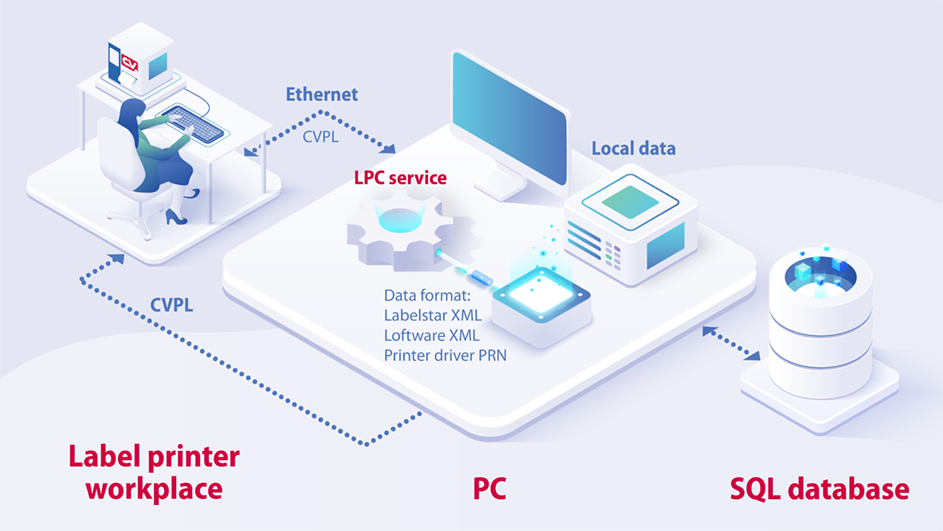
With LPC, you can manage and control all inputs directly on the printer, without having to use a PC. Centralized management of print templates and data minimizes the risk of misprints: all printers access the same centrally maintained and managed data.
Multiple printers can be controlled in parallel via a central configuration. LPC automatically creates an XML file from the entered data, which triggers either directory monitoring by Labelstar Office or Loftware Automation. Alternatively, PRN files can also be used.
The optional connection to an SQL database also enables the use of dynamic queries and individual database content—for maximum flexibility and automated printing processes.
- User input on the printer via software control
- Central management of label templates
- Consistent data
- No possibility of selecting incorrect files
- No memory card required
- Dynamic content possible (using an SQL database)
- Dynamic queries on the printer
- Use of Labelstar Office, Loftware Designer and Automation, Microsoft Word, etc. possible
- Simple configuration of complex applications possible
- Automatic control by service (continuous queries without manual intervention)
Downloads & Links
SPP – Silent PDF Printer: Automated PDF printing
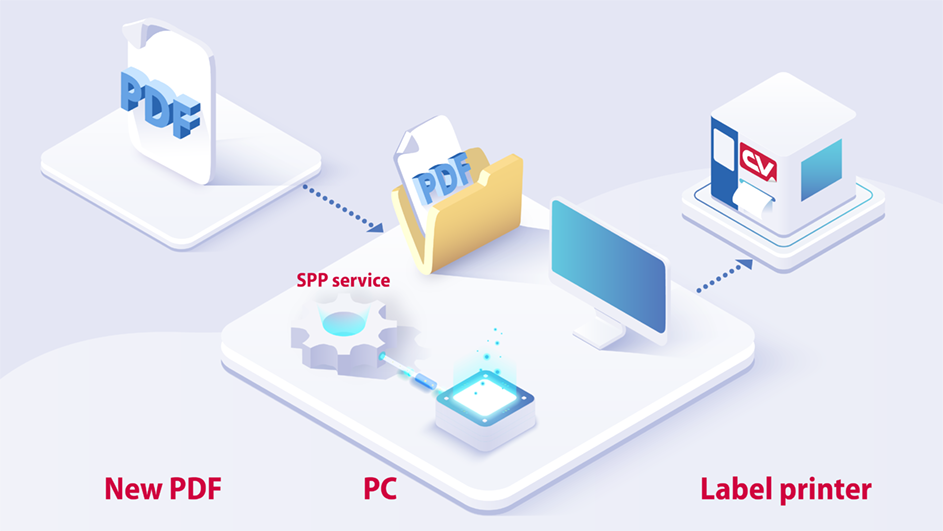
SPP monitors directories where PDF files are stored. The files are automatically recognized, converted to the CVPL printer language, and sent directly to the printer - all without manual intervention in silent mode.
Systems such as SAP can generate and print PDF files directly without additional software. Because PDF files already contain all font formats, there is no need to install special fonts on the printer afterwards – ensuring a fast, error-free, and automated printing process.
- A service with internal directory monitoring automatically checks for new PDF files, analyzes their format, and sends the data to the desired printer.
- No manual printing via a third-party program necessary.
- Archiving of the PDF file in case of printing errors.
- FFine tuning or additional content (e.g., date, time) possible through adjustments in the printer driver.
Downloads & Links
LTC – Labelstar TCP/IP Control: Process incoming data via TCP/IP
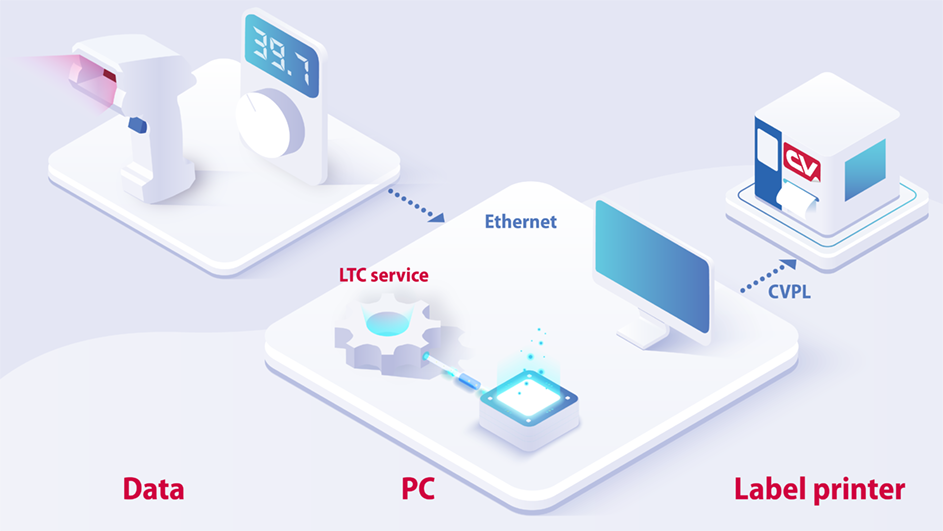
LTC operates as a TCP server and processes incoming data from TCP clients. This data is automatically analyzed, converted to XML, and forwarded directly to Labelstar directory monitoring for the generation of the print job.
Thanks to flexible filter technology, LTC processes not only standardized XML and CSV files, but also unstructured texts and GS1 barcode data.
- Easy configuration of printers and label data
- Serial assignment of input data with the object names of the label
- Filter for specific text positions and lengths in ASCII files
- Defineable search for application identifiers (AI) in GS1 data
- Direct use of PRN files possible
- Direct forwarding of data to directory monitoring possible
Downloads & Links
Systemvoraussetzungen
- Windows 10 or newer
- .NET Framework 4.8
- Current Valentin printer driver
- Current Valentin printer (from SH3)
